
The Dynamic NotchEngineered for Windows
A native, ultra-lightweight overlay for Windows 10 and 11. Media controls, hardware telemetry, quick notes, and file shelf anchored directly to your screen.
Crafted by

Core Specifications
Designed for desktop productivity
A focused set of desktop tools engineered for performance, staying out of the way until needed.
Windows SMTC Media Controls
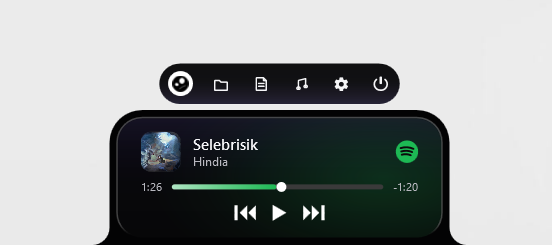
Direct integration with Windows System Media Transport Controls. View track title, album artwork, scrub progress, and playback buttons for Spotify, YouTube, and desktop players.
Hardware Telemetry
Live processor load, RAM consumption, storage activity, and battery status at a glance without launching Task Manager.
Persistent Quick Notes
A dedicated markdown scratchpad that saves state automatically to disk across launches. Ideal for temporary snippets and rapid checklists.
File Drop Shelf
Drag files directly onto the notch to stage them, reveal their origin in Explorer, or copy file paths directly to the clipboard.
Screen Edge Anchoring
Anchor to the top center, left edge, or right edge of your display with persistent memory across multi-monitor setups.
Native WPF Architecture
Compiled purely in C# WPF without Chromium or Electron runtimes. Consumes under 15 MB RAM and 0% CPU during idle background operation.
Interface Previews
Compact when idle. Expanded on hover.
Active Windows SMTC audio playback overlay with track title, artist info, and interactive timeline.
Official Packages
Download Packages
Windows Setup Installer (v2.1.1)
Automated per-user installation (%LocalAppData%). Operates without administrator rights.
Standalone Portable Archive
Extract and run directly with zero system modification. Portable for external drives.
Notchi Mobile Companion
Android companion app for remote telemetry and media playback synchronization.
Installation & Requirements
Three-step quick install
Download Setup Executable
Download the latest stable NotchiSetup.exe package from this site or GitHub.
Run Per-User Setup
Installs directly to your user profile directory with zero UAC elevation prompts.
Overlay Appears Instantly
The notch anchors to the top center of your display ready for immediate use.
System Compatibility Specs
Community & Feedback
What people say about Notchi.
Real experiences from Windows 10 & 11 users who integrated Notchi into their daily desktop workflow.
"Notchi benar-benar mengubah cara saya berinteraksi dengan laptop. Pemutar musiknya sangat responsif dan tidak memakan RAM berlebih. Desainnya menyatu sempurna dengan estetika Windows 11."
Alex Pratama
Windows 11 Power User
"Akhirnya ada aplikasi notch Windows yang tidak terasa seperti AI slop murahan. Tipografi bersih, animasi WPF native-nya instan, dan fitur side dock sangat membantu di setup layar sekunder saya."
Dian Sastrowardoyo
UI/UX Designer
"Fitur catatan cepat dan telemetri perangkat di menu baki sangat berguna saat lagi coding intens. Ringan, cepat, dan open source. Keren banget tim Notchi!"
Rian Hendrawan
Full-Stack Developer
FAQ